
Introducing Slider Layouts for Toocheke
- Slider, Toocheke Companion, Toocheke Theme
I’m thrilled to announce two brand new layout options now available in the Toocheke Premium theme.
These new Slider Layouts give readers the ability to navigate your comic posts directly from the home page—without needing to load a new page for each comic. It creates a smoother, more engaging reading experience that feels modern and effortless for your audience.
Note: These layouts are available in Toocheke Premium only and are not included in the free version of the theme.
Where to Find the New Layouts
You can select either of the new slider layouts by navigating to:
Appearance → Customize → Home Page Layout
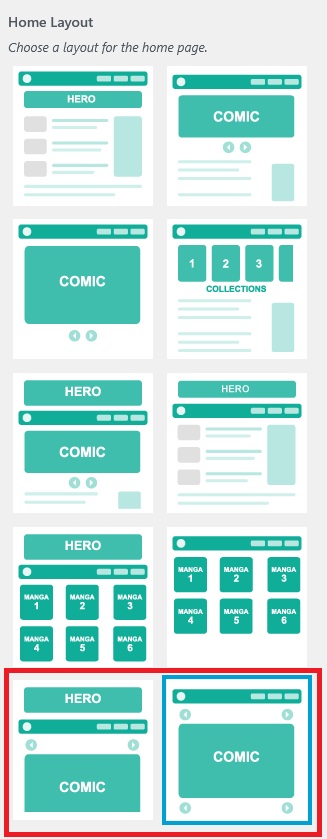
See the Layouts in Action
Want to see how they look before enabling them on your own site?
Recommended Settings for the Best Experience
To get the most out of the slider layouts, here are a few important settings to check:
Disable the Sidebar (Optional but Recommended)
Go to:
Appearance → Customize → Sidebar
Uncheck the sidebar option and click Publish.
Make Sure Dual Comic Display is Disabled
Go to:
Toocheke → Options → Display
Ensure the option to display two versions of the comics is turned off.
Choose Your Social Sharing Options
Go to:
Toocheke → Options → Social Sharing
Select the platforms you want displayed.
Enable Analytics
Go to:
Toocheke → Options → Analytics
Configure the analytics options you want to use.
Adding Your Comic Pages
Each page of your comic should be added as its own post:
Toocheke → Add New Comic
This allows the slider layout to work seamlessly across your comic pages.
Get Toocheke Premium
If you’re ready to unlock these new layouts and give your readers a better comic browsing experience, you can purchase Toocheke Premium here:
If you have any questions or feedback, feel free to reach out—I’m always happy to help.
Happy Tooning!