

Tapas is reportedly shutting down. If you’re a creator who’s published on Tapas, this guide walks you through pulling your own series — episodes, images, and all — into a WordPress site running Toocheke Companion (2.23+), before it’s gone.
This feature only imports content Tapas serves publicly, for free, to anonymous visitors. Paid (“Wait Until Free”) and mature-gated episodes can’t be pulled this way — you’ll get a clear summary of anything skipped and why.
Before you start
- Toocheke Companion 2.23 or later, active on your WordPress site.
- The Tapas.io URL for each series you want to import — format:
https://tapas.io/series/your-series-name.
Steps
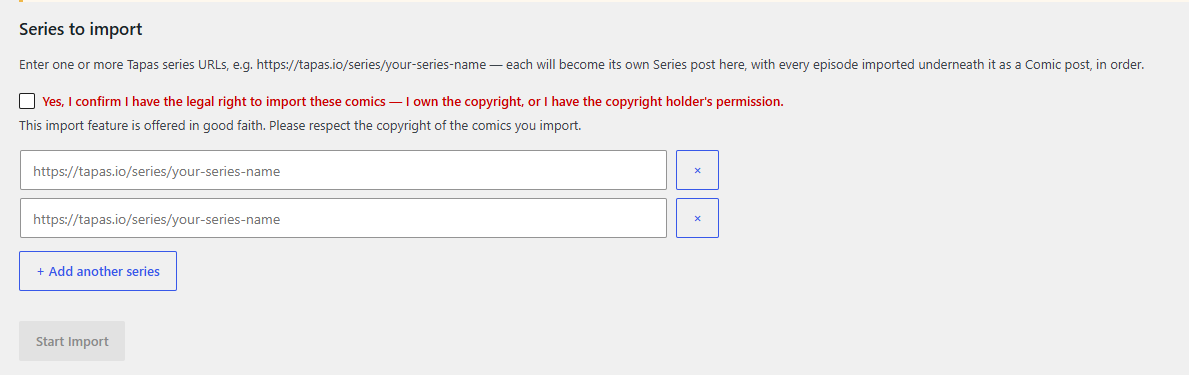
- In your WordPress admin, go to Toocheke → Import: Tapas.
- Check “Yes, I confirm I have the legal right to import these comics — I own the copyright, or I have the copyright holder’s permission.” This has to be checked before Start Import will do anything.

- Paste in one or more series URLs. Use + Add another series for more than one.
- Click Start Import.
What happens next
Each series becomes its own Series post, with every episode imported underneath it as a Comic post, in original order — episode title, publish date, and images all carried over.
Large series take a while on purpose — the import paces itself to avoid tripping Tapas’ rate limits. You can close this tab and come back later; it picks up exactly where it left off.
If Tapas skipped an episode (locked/paid or mature-gated content), you’ll see a summary once the series finishes, e.g. “128 episodes imported, 8 skipped (8 locked/paid).” No placeholder posts are created for those.
If something needs attention
Occasionally a page won’t load — usually temporary. The importer retries automatically with increasing delays. If it still can’t get through after several tries, you’ll see Retry This Series and Resume From This Episode — the second lets you manually point it past a specific stuck episode once you’ve checked it yourself on Tapas.
Questions or issues?
If you run into anything unexpected, reach out to us and we’ll help sort it out.